
Go As A Scripting Language for Atuin Runbooks
Do you know Jupyter Notebooks? They're a convenient way (primarily intended for scientists) to compose snippets of Python code together with relevant documentation into a single document, runnable right from within the app.
Atuin Desktop is for shell scripts what Jupyter Notebooks is for scientific scripts. You can compose Runbooks from documentation, shell scripts, SQL statements, kubectl get commands and interactive elements. I came across Atuin just recently (when they announced that Atuin Desktop goes open source) and instantly became curious if I could run Go code as a “shell script” inside a Runbook.
Shell scripts in Atuin work like this: You write shell commands into a “Script” block, and Atuin passes it to a shell or interpreter using them in batch mode, like /usr/bin/bash -c <command> or /usr/bin/ruby -e <command>.
Atuin lets you add custom shells or interpreters, so my first thought was to add something like go run. There is, however, a tiny problem with that: The Go compiler doesn't read from stdin. It expects to find .go files in the working directory.
I could, in theory, write a wrapper that does something along these lines:
cat <<EOF | tee /tmp/blah.go | go run /tmp/blah.go

package main
import "fmt"

func main() {
  fmt.Println("Hello, World!")
}
EOF
While this could work (I didn't test it), it feels a bit clumsy, and it requires creating a file, which I would want to avoid.
Then I remembered Yaegi, a Go interpreter for scripts (as a command) and for Go plugins (as a library). Yaegi has a REPL mode, as well as a batch mode via yaegi run -e.
So I tried it!
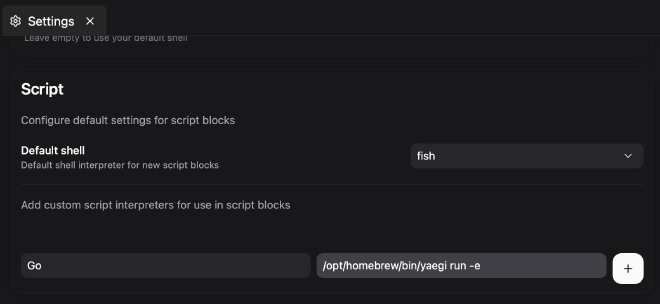
Step 1: I added Yaegi as a custom script interpreter for Script blocks:
Step 2: I created a Runbook with three blocks:
- One block that sets a variable
- One that runs a
fmt.Println()statement with the variable as input - And one that displays the output of the script
Between the action blocks, I added documentation blocks to show how Atuin lets you combine code and docs into a single document.
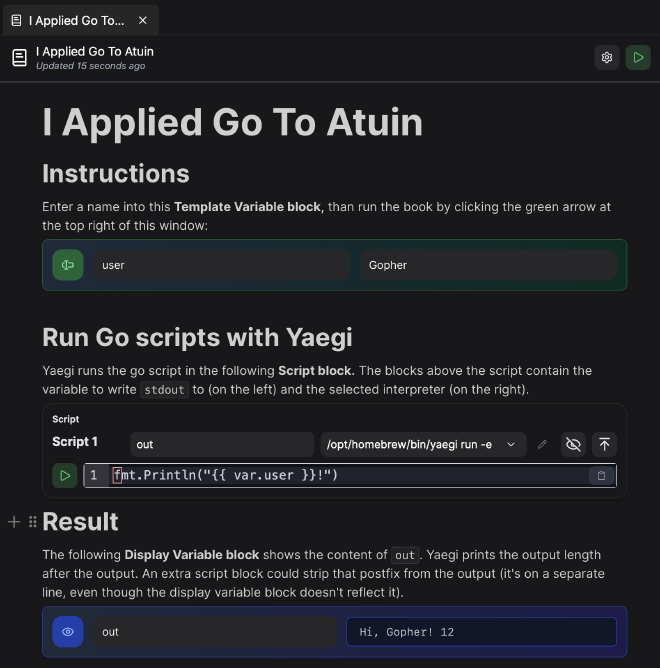
The string passed to fmt.Println() in the script field might look like a Go template placeholder, but in fact it's an Atuin placeholder. var.user evaluates to the variable user defined in the Template Variable block.
It's fun to play with Atuin! Usually, I'd use Taskfile for building CLI commands, but Atuin shines with a convenient UI and treats documentation as a first-class citizen (which, like Jupyter Notebooks, reminds me remotely of Donald Knuth's Literate Programming, an approach to weave documentation and code seamlessly into one document. Literate Programming was clearly ahead of its time, but Jupyter Notebooks and Atuin Desktop are noteworthy interpretations of this approach.)
Atuin Desktop is open source; only the Hub isn't. The Hub powers a paid synchronization service